
The best HubSpot alternative depends on what your sales team is trying to simplify.
- Pipedrive is the clearest option for a focused pipeline, follow-up and forecasting workflow.
- Close fits teams that sell mainly by phone, email and SMS and want those conversations inside the CRM.
- Zoho CRM offers broad sales functionality at the lowest five-seller price in this shortlist.
- monday CRM suits teams that want to shape the CRM around configurable boards, automations and internal handoffs.
- Attio fits teams that care about a flexible data model, relationship context and programmable workflows.
- Breakcold is the specialist choice for sales driven by ongoing conversations across email and social channels.
None is a one-for-one replacement for every part of HubSpot. If you use Marketing Hub, Service Hub, Data Hub or Revenue Hub as well as Sales Hub, list those workflows before you compare subscriptions. Moving the sales CRM can still leave you paying for another Hub, rebuilding an automation or adding a separate tool.
This review is for B2B teams with 2–10 sellers replacing HubSpot as their sales CRM. It covers records and pipeline, activity history, email and calendar connections, follow-up, meeting scheduling and forecasting. Product details and prices were reviewed on 21 September 2026.
HubSpot alternatives at a glance
The prices below use public USD rates, annual billing, five paid sellers and no tax. They are configuration comparisons rather than estimates of migration, implementation or usage costs.
We use two practical requirements:
- Lean sales CRM: account and contact records, opportunities and pipeline, tasks and activity history, plus connected email and calendar.
- Follow-up and visibility: everything above, plus a multi-step sequence that exits after a reply, a buyer-facing booking page and a time- or category-based revenue forecast.
| Product | Best reason to shortlist it | Five-seller annual configuration | Main limit to check |
|---|---|---|---|
| HubSpot, as the benchmark | Keep one customer platform across sales and other Hubs | Starter: $1,200 durable base. Professional: $6,900 in year one, then $5,400, for the fuller follow-up scenario | The wider footprint spans separately purchased Hubs; Professional also has onboarding cost. |
| Pipedrive | Focused pipeline, email, sequences, scheduling and forecast work | Growth: $2,340 | Its Sequence does not stop itself after a reply; a separate Automation can add reply-aware branching. |
| Close | Calling-led selling with email, SMS, workflows and coaching in the CRM | Essentials: $2,100. Growth: $5,940 plus usage | Buyer self-booking needs Calendly or another scheduler; telephony and some AI costs sit outside the seat price. |
| Zoho CRM | Broad sales workflow coverage at a low seat price | Standard: $840 | Reply-aware Cadence exit has rollout and sender conditions; edition limits and administration matter. |
| monday CRM | A configurable sales workspace with sequences and forecasting | Pro: $1,680 before AI credits | It can create calendar meetings, but a public buyer-booking page was not established. |
| Attio | A flexible relationship CRM with scoring, routing and programmable workflows | Plus: $2,100 for the lean setup. Pro: $4,740 for sequences and forecast | Sequences are for warm leads and customers; native buyer booking was not established. |
| Breakcold | Conversation-led selling across email, LinkedIn, WhatsApp and Telegram | $1,790.40 with five seats and one connected mailbox per seller; calendar sync is optional | It is not a complete sequence, booking and forecasting replacement. Connected accounts, tokens and add-ons change the total. |
HubSpot currently advertises a lower new-customer Starter promotion, but its durable base is $20 per seat per month. We use that durable price above. The follow-up scenario uses Sales Hub Professional and includes its required onboarding charge in year one. Other Hubs, add-ons and usage are outside that total. HubSpot Sales Hub pricing explains the current packages.
The lowest number in the table does not identify the best replacement. It only tells you what the named setup costs before migration work, usage, external services and any HubSpot products you keep.
Compare the work before you compare the maps
A product's fit map shows where it concentrates across the revenue process. Core means an area is central to the product. Supporting means it plays a substantial secondary role. Adjacent means it contributes at the edge. These product-purpose labels are separate from the Strong and Partial labels used for individual sales jobs.
A broader map is not automatically better. A small team that already has marketing automation and customer support may get more value from a focused CRM with a tight pipeline workflow. A team coordinating marketing, sales, service and revenue operations may benefit from HubSpot's wider reach, even if it pays for more products and administration.
The shape also does not tell you that every capability is included in one plan. HubSpot's map covers its wider customer platform. Other products also place sequences, forecasting, AI or data features on higher plans or behind usage limits. Match the map to the package you intend to buy.
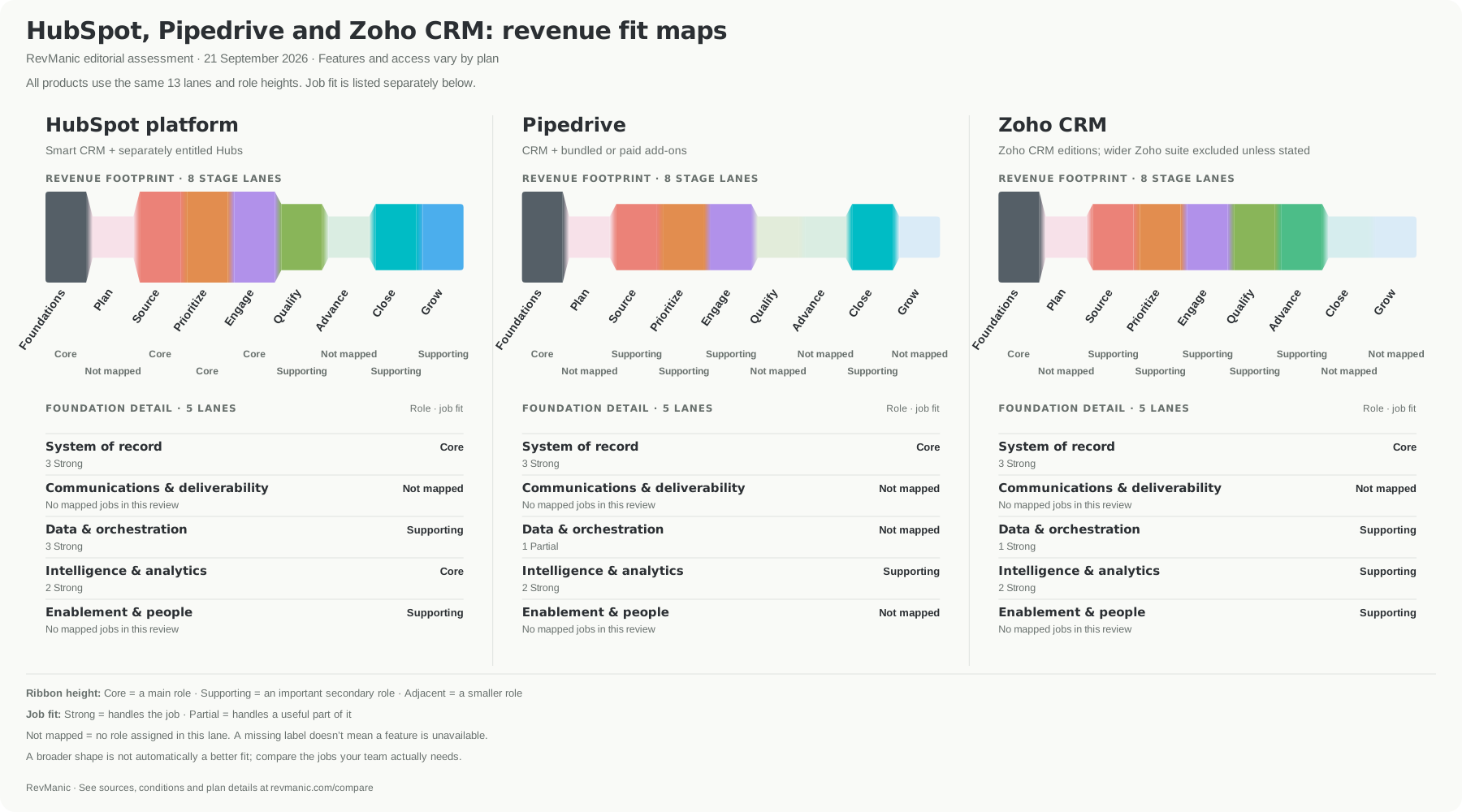
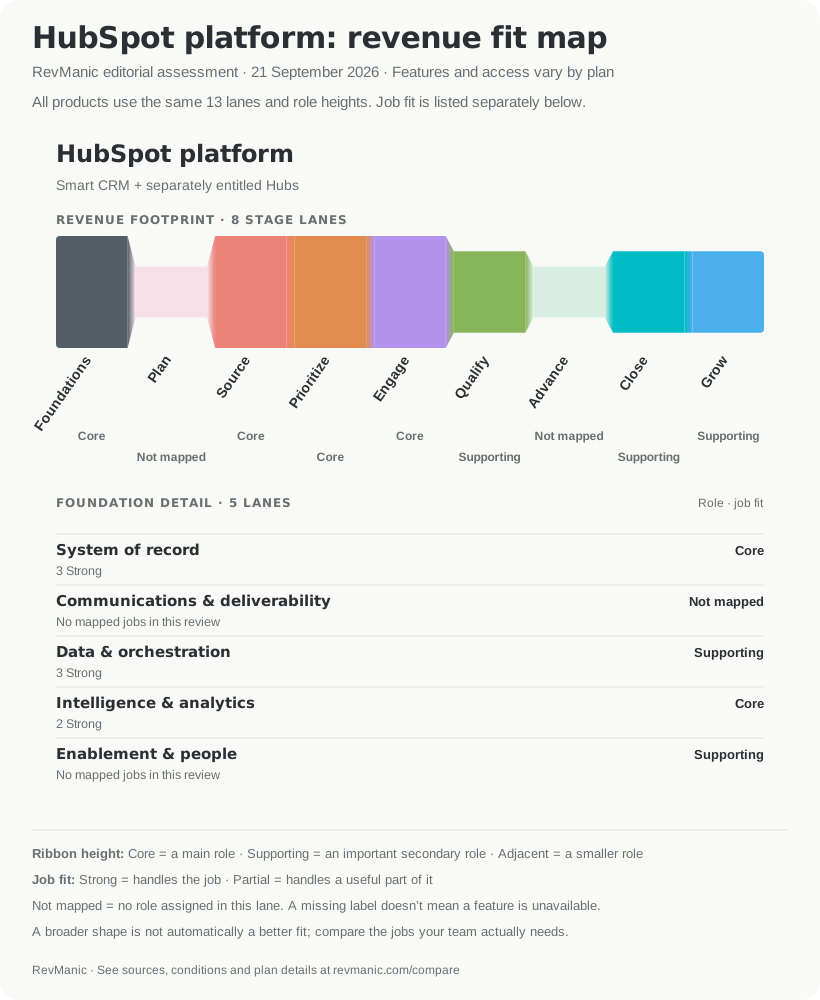
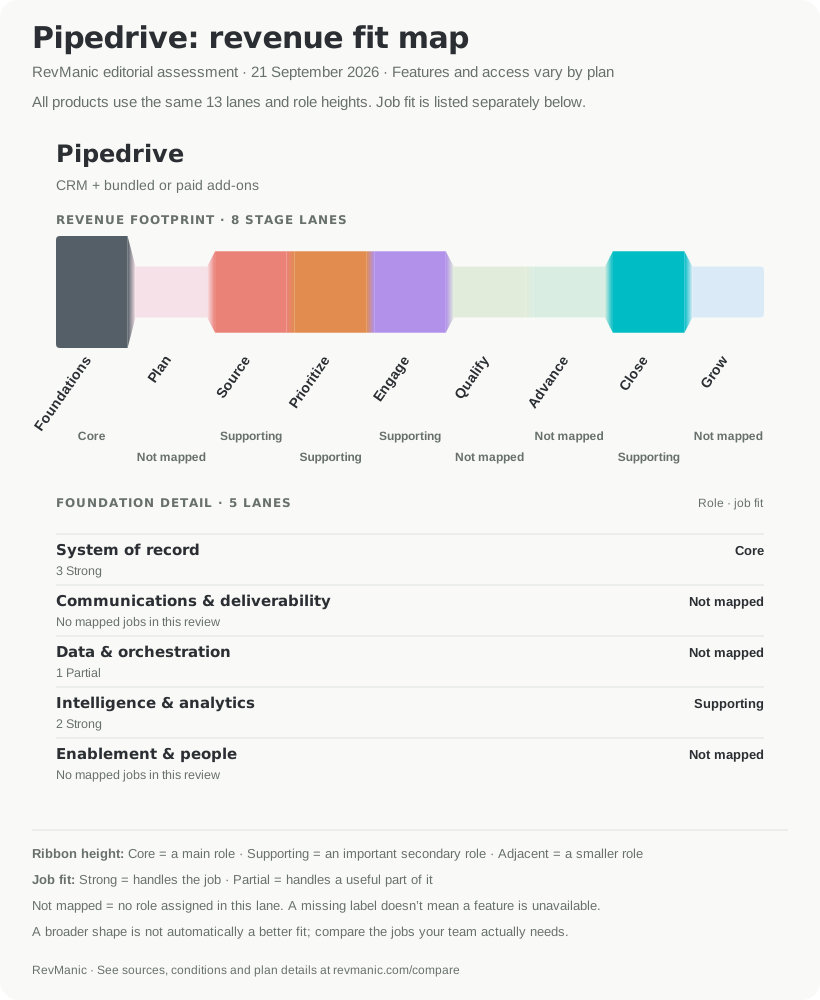
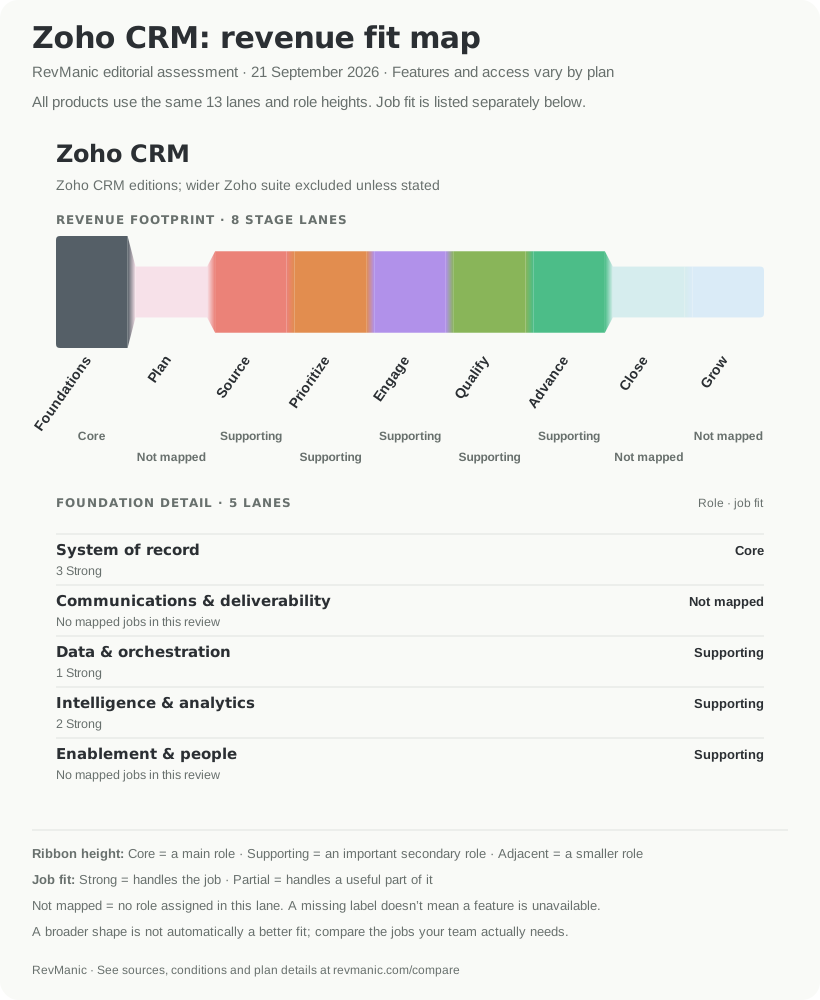
HubSpot, Pipedrive and Zoho CRM on the same 13-lane scale. Ribbon height shows each product's role in an area; Strong and Partial describe the mapped jobs below it. The map reflects RevManic's assessment on 21 September 2026, not a plan-entitlement or product-quality score.
The first comparison group puts HubSpot beside two conventional sales-CRM choices. Pipedrive is more tightly centered on the seller's pipeline and follow-up work. Zoho covers a broad set of CRM tasks at a lower list price, with more edition and administration details to verify. The useful question is whether either shape matches the work you want to preserve, rather than how much of the map is coloured.
Explore the jobs behind this group in RevManic's HubSpot, Pipedrive and Zoho CRM comparison.
1. Pipedrive: best for a focused pipeline and follow-up workflow
Pipedrive is the most direct choice when the sales team wants records, deals, tasks, email, meetings and forecast work in a focused CRM. Growth includes email sync, group email, sequences, scheduling, automations and forecast features. That covers most of the everyday sales jobs in this review without buying a wider customer platform.
There is one important sequence detail. Pipedrive Sequences requires a user to mark a sequence complete when a contact replies elsewhere or asks to opt out. Pipedrive Automations can watch for a reply and branch or stop subsequent actions, but that is a separate configured workflow. Test the exact setup rather than assuming the named Sequence handles the reply by itself.
Pipedrive also has a documented forecast method using expected close dates and weighted values. Its revenue forecast report and forecast goals make it a real forecasting option, not just a visual deal board.
Pipedrive's pricing surfaces changed during this research. On the publication-day recheck, the English Pipedrive pricing page showed Growth at $39 per seat per month with annual billing, or $2,340 per year for five sellers. Recheck the price shown to your team before using that figure in a budget.
Choose Pipedrive when your team wants a conventional sales CRM with less platform breadth. Keep looking if cross-Hub marketing, service or data workflows are the reason HubSpot works for you.
For a closer look at this pair, read Pipedrive vs HubSpot or open their preselected RevManic comparison.
2. Zoho CRM: best for low-cost breadth
Zoho CRM Standard is the lowest-priced five-seller configuration in this shortlist at $14 per user per month billed annually, or $840 per year. Standard includes the core CRM setup used here, as well as Calendar Booking, forecasting and Cadences. The Zoho edition comparison shows where more advanced features begin.
That breadth comes with limits to check carefully. Cadence allowances rise by edition. A single enrollment action is capped at 10,000 records. Zoho can automatically remove a record from a Cadence after a response, but that function is rolling out in phases. When mail is sent through a public-domain address such as Gmail, replies cannot be captured or categorized for that response rule. Zoho's Cadences guide explains the current limits.
Zoho is a strong price-led shortlist choice when the team is willing to configure a broad CRM and verify its edition rules. It is a weaker choice if you want the plan and workflow boundaries to stay simple, or if your follow-up process depends on reply detection from a public-domain sender.
Its HubSpot Data Sync path covers core company, contact, deal and lead mappings, but the listing conflicts about activity and custom-module coverage. Treat those objects as a migration test, rather than assuming the sync will reproduce your current HubSpot history.
3. Close: best for calling-led sales teams
Close brings CRM records, email, SMS and calling into the same sales workflow. Growth adds workflows, Power Dialer and bulk email. Its workflows can stop when an incoming email, SMS, call or booked meeting meets a response goal. Close also provides Expected Revenue Views and a confidence-times-value approach to forecasting. Close Workflows and Close reporting describe those two jobs.
The main gap in the strict follow-up scenario is buyer self-booking. A rep can create a meeting in Close and write it to a connected Google or Microsoft calendar. The buyer-facing route established in this review uses Close's Calendly integration, which brings another subscription and set of limits.
Price the communication layer as well as the seats. Five Essentials seats cost $2,100 per year. Five Growth seats cost $5,940 per year before telephony, phone numbers, SMS and some AI usage. The Close pricing page lists those separate costs.
Close deserves a place on the shortlist when calls and direct rep communication are central to how deals move. Its coaching workflow covers live monitoring, recordings, transcripts, feedback and performance metrics. Live listen, whisper and barge controls have higher-plan and calling conditions. Do not choose it only because the CRM seat total looks simpler than HubSpot; build the complete calling and scheduling cost first.
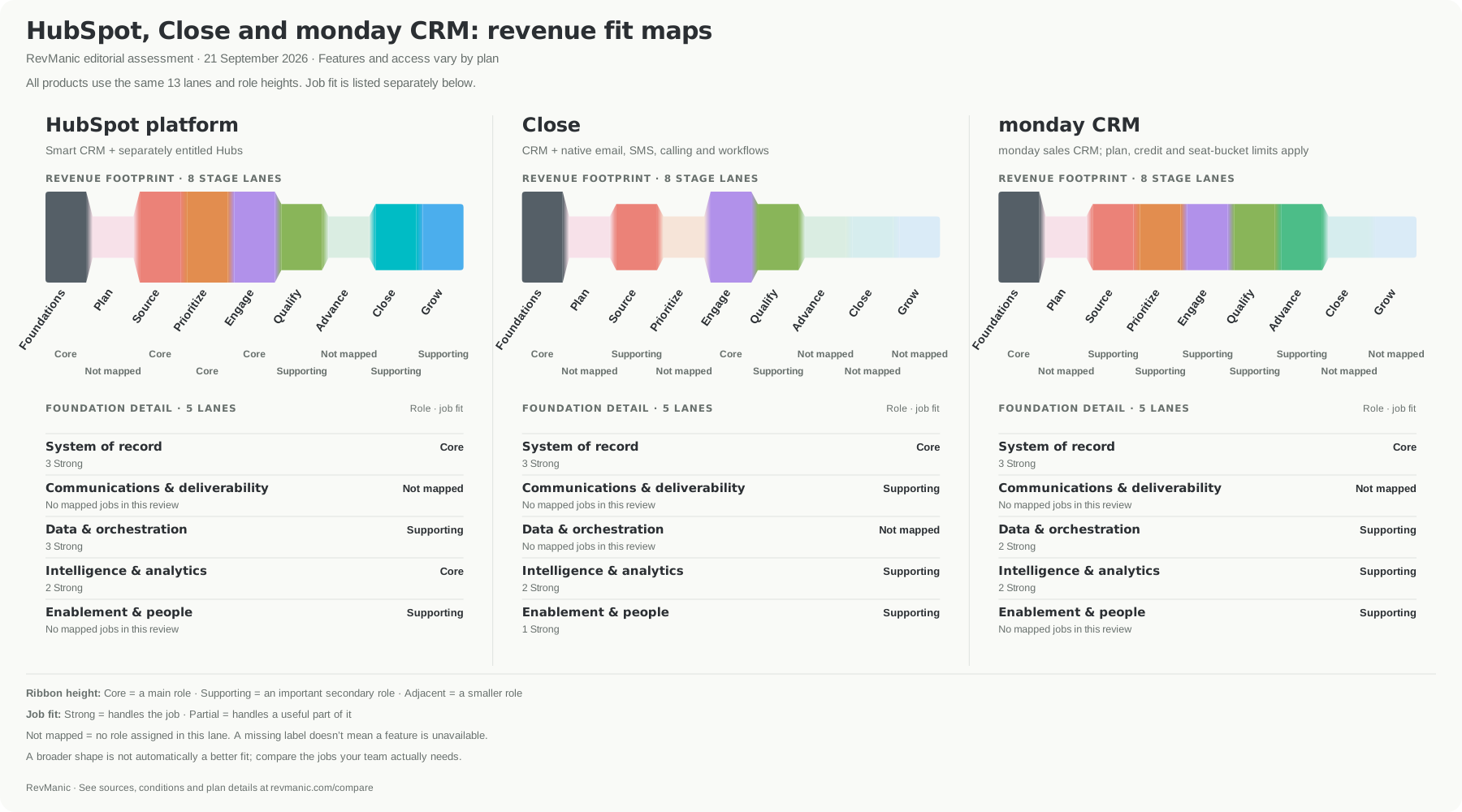
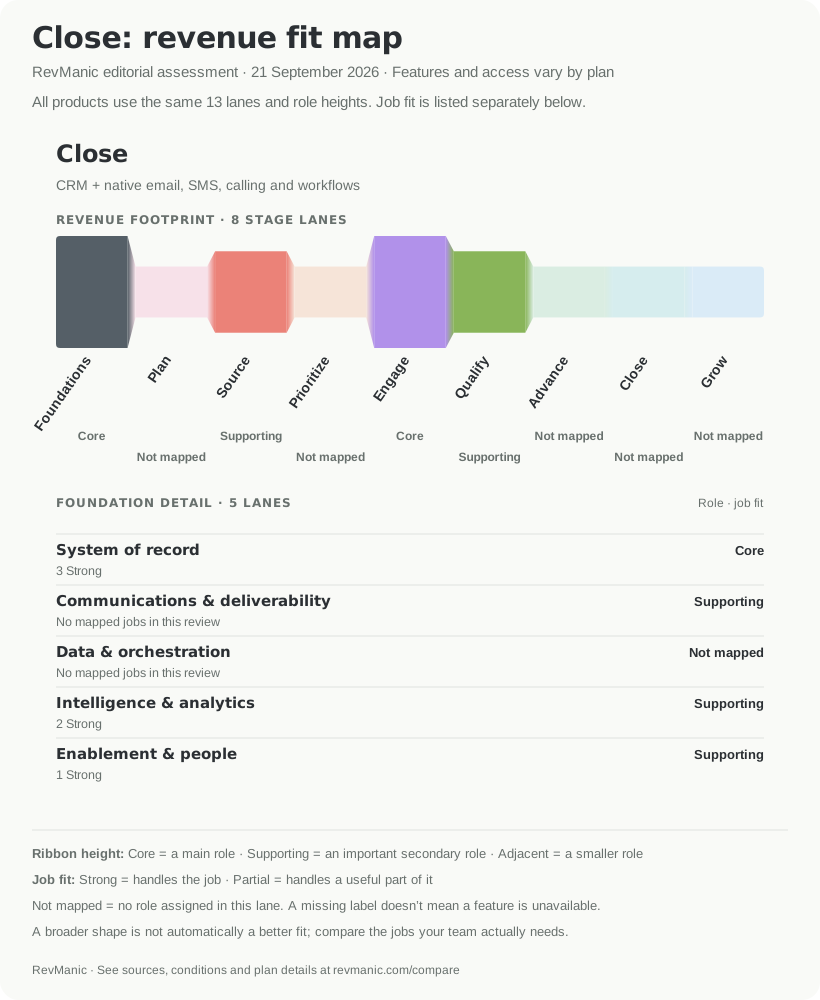
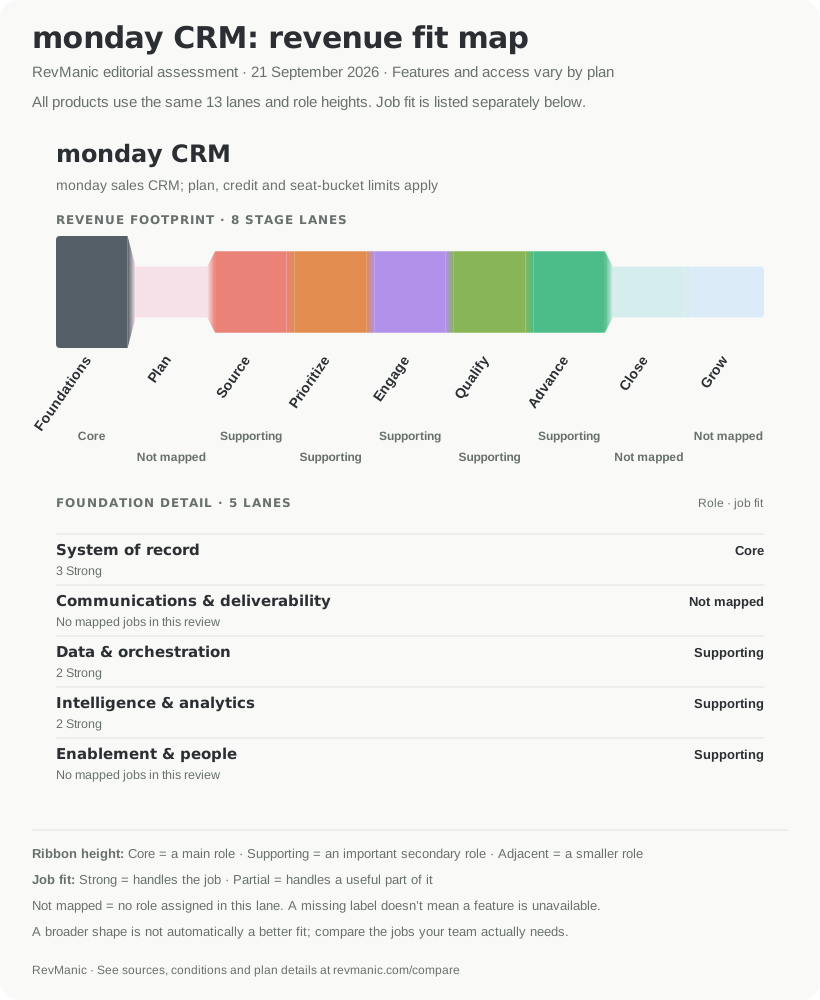
HubSpot, Close and monday CRM on the same 13-lane scale. The different shapes reflect different jobs: a wider footprint is not automatically a better fit. Assessment dated 21 September 2026.
This group shows why map breadth needs context. Close can be the better fit for a team whose daily work is calling, messaging and coaching, even when HubSpot reaches more parts of the customer lifecycle. monday CRM can be the better fit when the team needs a configurable operating layer around the pipeline. Compare HubSpot, Close and monday CRM by the jobs you actually plan to move.
4. monday CRM: best for configurable sales operations
monday CRM suits teams that want to adapt boards, automations, dashboards and handoffs around their sales process. Pro includes sequences, and its Forecasting View can use deal stages or Commit, Best Case and Pipeline categories against targets. It supports a real forecast workflow with drill-down, although the feature is still in gradual rollout. See monday's Forecasting View.
At the annual USD rate reviewed, five Pro seats cost $1,680. monday sells seat buckets, but five sellers fit an exact five-seat bucket. A two-person team would still buy three seats. The monday CRM pricing page is also the safer current source for its Pro limit of 100,000 active contacts and deals; another monday page says contacts are unlimited, so confirm the contractual limit if scale matters.
Meeting creation is narrower than HubSpot scheduling. monday can create a Google Calendar event, invite attendees and put the meeting on the CRM timeline. Its page conflicts on whether that starts at Standard or Pro, and it does not establish a public availability or self-booking page. We therefore price the workflow at Pro and treat the strict buyer-booking requirement as incomplete. monday's Google Calendar integration shows the documented flow.
monday is worth evaluating when sales work needs to connect to a configurable internal process. Check automation limits, AI credits, record caps and permissions on the actual package. If your priority is an opinionated sales workflow with fewer choices to configure, a more focused CRM may fit better.
5. Attio: best for a flexible data model and warm relationship sales
Attio combines a flexible CRM model with email and calendar context, workflows and relationship data. Native workflows can assign records round-robin. On Pro, teams can build a fit-and-intent score, run sequences and forecast weighted pipeline by giving each stage a close probability. The weighted-pipeline guide describes the forecast calculation.
Its outreach boundary is unusually clear. Attio sequences are for existing customers and warm leads. Attio excludes cold or high-volume outreach, and sending runs through connected Gmail or Microsoft mailboxes with pacing limits. This can fit a relationship-led motion well, but it is not a replacement for a cold-email platform.
Five Plus seats cost $2,100 per year for the lean CRM scenario. Pro costs $4,740 per year and is the relevant package for sequences, formula attributes and the weighted forecast. Workflow credits and external data tools can add cost. Attio can sync and display calendar meetings, but this review did not establish a native availability page or buyer-booking workflow.
Attio includes an Import2-assisted HubSpot migration path on Plus and above. Treat that as a one-time migration, not continuous synchronization. Ongoing two-way sync is available through tools such as Polytomic, with a separate service and setup.
Choose Attio when your team values a flexible object model, relationship context and workflows enough to configure them. Check the migration shape carefully if your HubSpot account depends on long activity histories, custom objects or cross-Hub automation.
6. Breakcold: best for conversation-led social selling
Breakcold is the most specialized option here. It brings email, LinkedIn, WhatsApp and Telegram conversations into a CRM-style inbox around people, companies and deals. Its paid Karen agent looks for inactive conversations, creates follow-up tasks and drafts a reply for a person to review and send.
That workflow should not be confused with a conventional sales-engagement sequence. It prepares one supervised follow-up across an existing conversation, rather than a multi-step cadence with enrollment and stop rules. Breakcold also has pipelines and a bounded Daily Brief, but this review did not establish a native buyer-booking page, a stated revenue forecast method or a custom report builder.
Breakcold's current annual base is $950.40 and includes one seat, two connected accounts and 1,500 monthly tokens. A five-seller setup with one connected mailbox per seller costs $1,790.40 per year; Google or Outlook calendar sync can be enabled with that mailbox connection. One mailbox and one LinkedIn account for every seller raises the total to $2,390.40 before token top-ups. Karen adds $12 per month for 40 conversations per day or $20 for 80, shared across the workspace. Breakcold pricing shows the base, seats and connected-account model.
Connected accounts matter because a mailbox and a LinkedIn account are separate billable connections. Tokens also pay for actions such as meeting recording, enrichment and API writes; Breakcold publishes the current per-action token rates. Do not compare Breakcold's base plan with a five-seat CRM total until you have counted the channels and usage your team needs.
Breakcold can be the better fit when deals are already managed through direct multichannel conversations and the team wants those conversations gathered around CRM records. It is not a complete one-package replacement when native cadences, buyer scheduling and formal forecasting are mandatory.
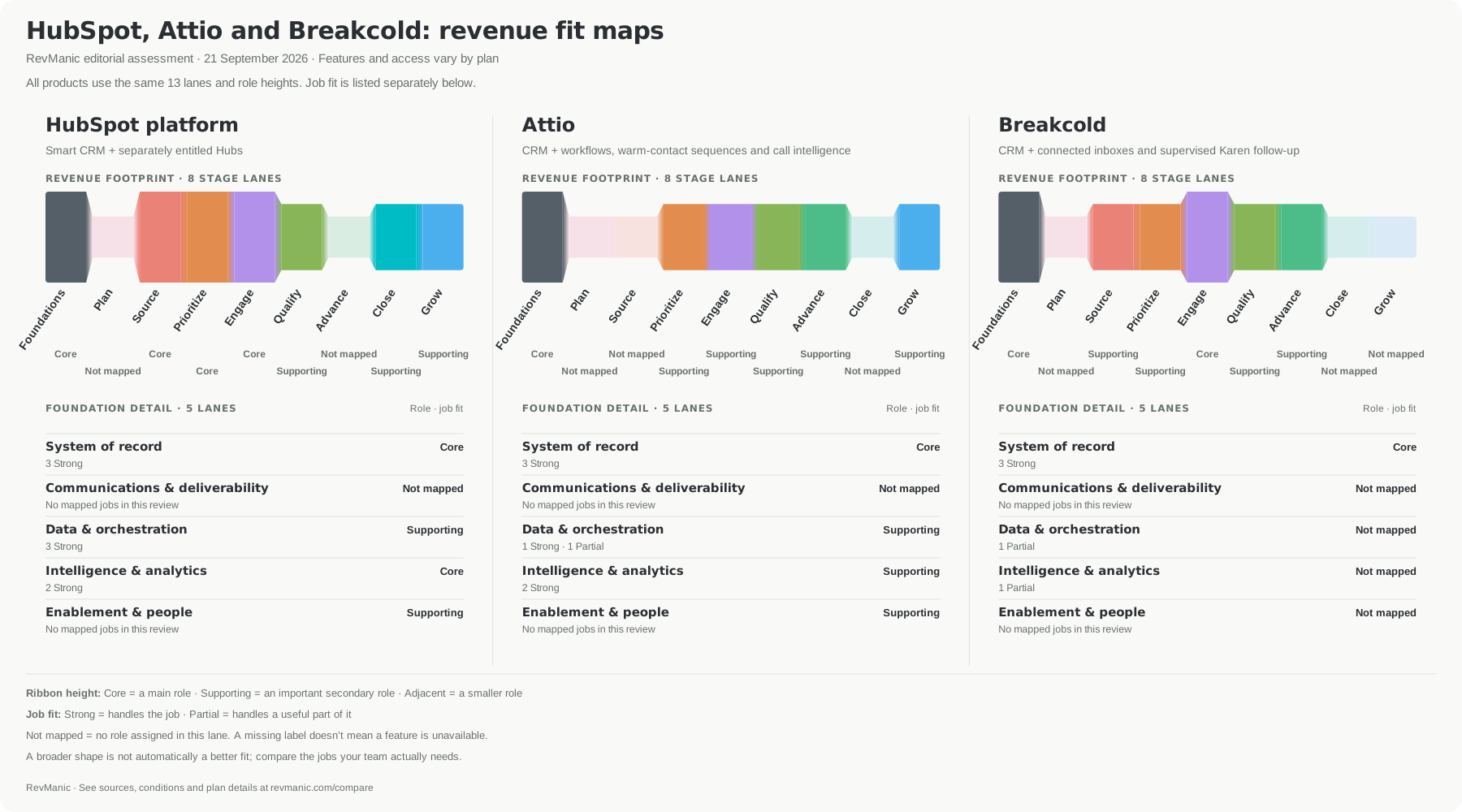
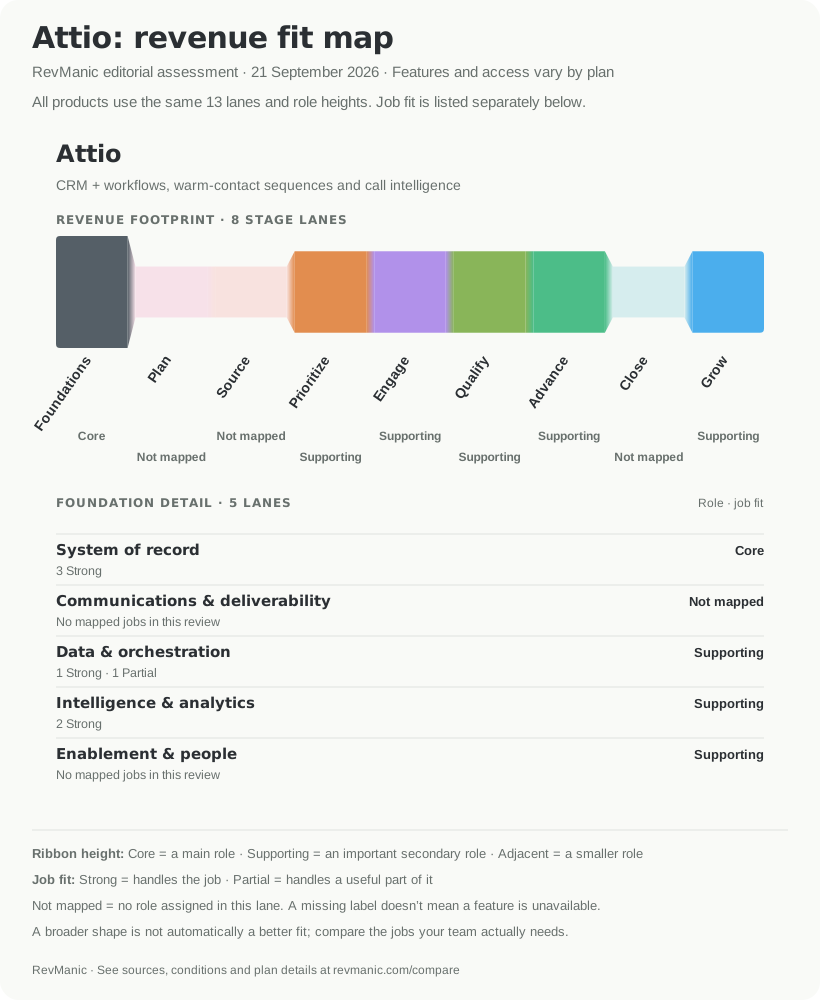
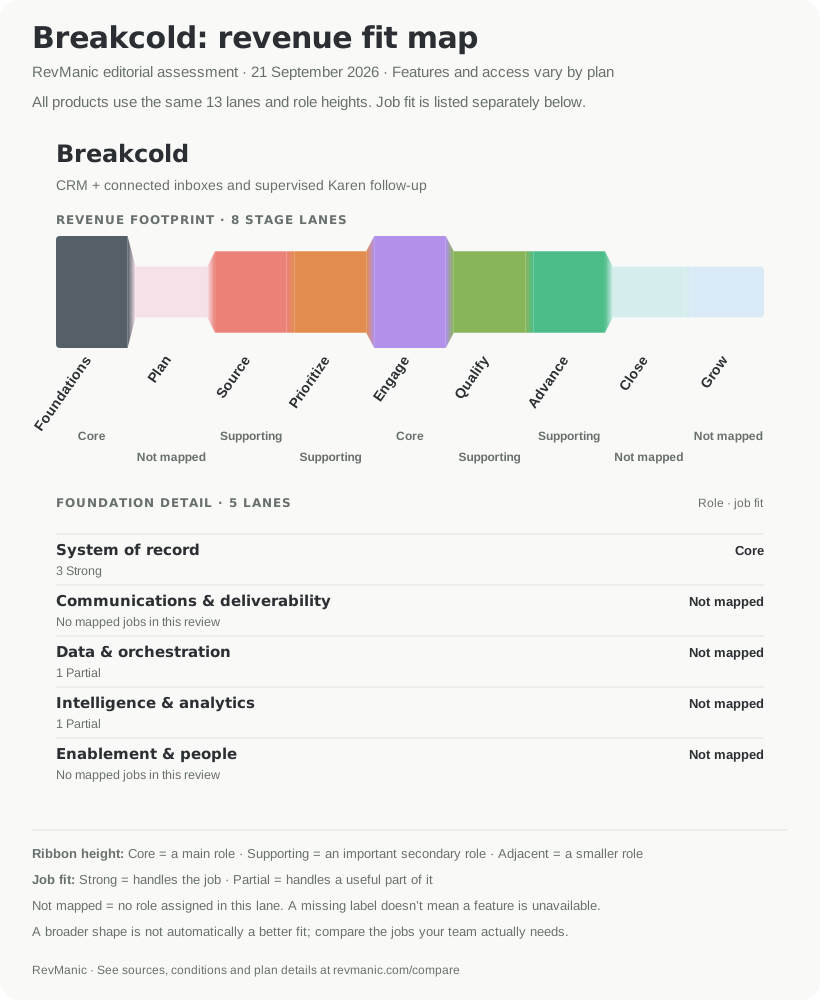
HubSpot, Attio and Breakcold on the same 13-lane scale. The narrower maps can be the stronger setup fit when they cover the team's required jobs without adding unwanted platform scope. Assessment dated 21 September 2026.
The final map group compares three very different shapes. Attio is built around adaptable relationship data and workflows. Breakcold concentrates more tightly on conversations and social-selling activity. HubSpot spans more of the revenue lifecycle. None of those shapes wins by itself: the right one is the shape that covers your must-have jobs without forcing the team to buy or maintain work it does not need.
Open the HubSpot, Attio and Breakcold comparison to inspect the individual job findings.
When keeping HubSpot is the better decision
Switching is easier to justify when it fixes a specific problem. Keeping HubSpot can be the better choice when:
- sales depends on workflows shared with Marketing Hub, Service Hub, Data Hub or Revenue Hub;
- company and deal scoring, structured deal qualification or customer-success health signals matter to the same process;
- your reporting relies on fields and events spread across several Hubs;
- replacing the CRM would still leave enough HubSpot products in place that the saving disappears;
- the cost and risk of rebuilding automations, permissions, reports and integrations outweigh the problem you are trying to solve.
HubSpot's wider footprint is valuable when those connections are part of the job. It is overhead when the team needs only a focused pipeline and follow-up system. Write down which of those statements describes your setup before asking for demos.
Run the same replacement test in every product
Use synthetic records and give two sellers and one manager the same exercise in each shortlisted product:
- Import companies, contacts, opportunities, owners, custom fields and duplicate records. Confirm the relationships survive, then export the records again with reusable identifiers.
- Connect a test mailbox and calendar. Check that an external reply and meeting land on the correct person and opportunity without a manual BCC step.
- Build a three-step follow-up sequence. Reply from an outside mailbox and confirm that later steps stop.
- Book from a public link. Check that the meeting reaches the right owner, calendar and CRM record. Record when the product needs an external scheduler.
- Create a forecast, then change stage probability, forecast category, close date and deal value. Check that totals move in a way the manager can explain.
- Test lead assignment, seller and manager visibility, workflow limits and permissions with the roles you intend to buy.
- Write down how notes, emails, meetings, attachments, custom objects, reports and automations will migrate or be rebuilt.
- Price the exact seats, buckets, external subscriptions, usage, connected accounts, credits and HubSpot products that remain.
Pass or fail each workflow against the package in the quote. A feature on a higher tier, an external integration or an unresolved migration field should stay visible in the decision.
Build a shortlist around your team's jobs
Start with the reason you are leaving HubSpot:
- For a more focused conventional sales CRM, compare Pipedrive and Zoho CRM.
- For communication-heavy selling, compare Close and Breakcold, while keeping their different levels of workflow coverage in view.
- For a CRM shaped around your own data and process, compare monday CRM and Attio.
- If shared marketing, sales, service and data workflows are essential, include keeping HubSpot as a real option.
Use the RevManic comparison tool to build your own group of up to three products. The HubSpot profile, Pipedrive profile, Close profile, Zoho CRM profile, monday CRM profile, Attio profile and Breakcold profile show the findings behind each fit map.
Editorial note
These comparisons reflect RevManic's editorial opinion. Check each company's website for current product details and terms. Represent the product? Contact hello@revmanic.com to request a correction or claim your profile.
All articles