
If your small B2B team mainly needs CRM records, reliable follow-up and forecasting, Pipedrive Growth is a sensible place to start. It covers that work at a lower fixed cost for five sellers. HubSpot belongs on the shortlist when your decision also depends on account scoring, guided qualification, data operations or coordination across marketing, sales and service.
The useful comparison starts with the work your team needs to get done. Pipedrive is a sales CRM with features split across plans and add-ons. HubSpot is a broader customer platform: Smart CRM plus Marketing, Sales, Service, Data and Revenue Hubs. The fit maps reflect those different scopes. For the sales CRM tasks and costs below, we use Sales Hub Professional. Some capabilities on HubSpot's wider map require another Hub and a separate purchase.
How we compare the two CRMs
We looked at 21 jobs a sales team might need a CRM to handle, from keeping records up to date to running follow-up sequences and forecasting. This gives the review a clear scope, though it doesn't cover everything either platform can do.
We compare each product against the same jobs, while keeping its plans and add-ons in view. You can explore the individual jobs and fit labels in our live comparison.
A Strong fit means the product can handle the job directly within the scope of this comparison. Partial means it can handle a useful part of the job. If a job is Unassigned, we haven't confirmed enough to give it a fit label. That doesn't mean the product can't do it.
The fit maps show focus versus breadth
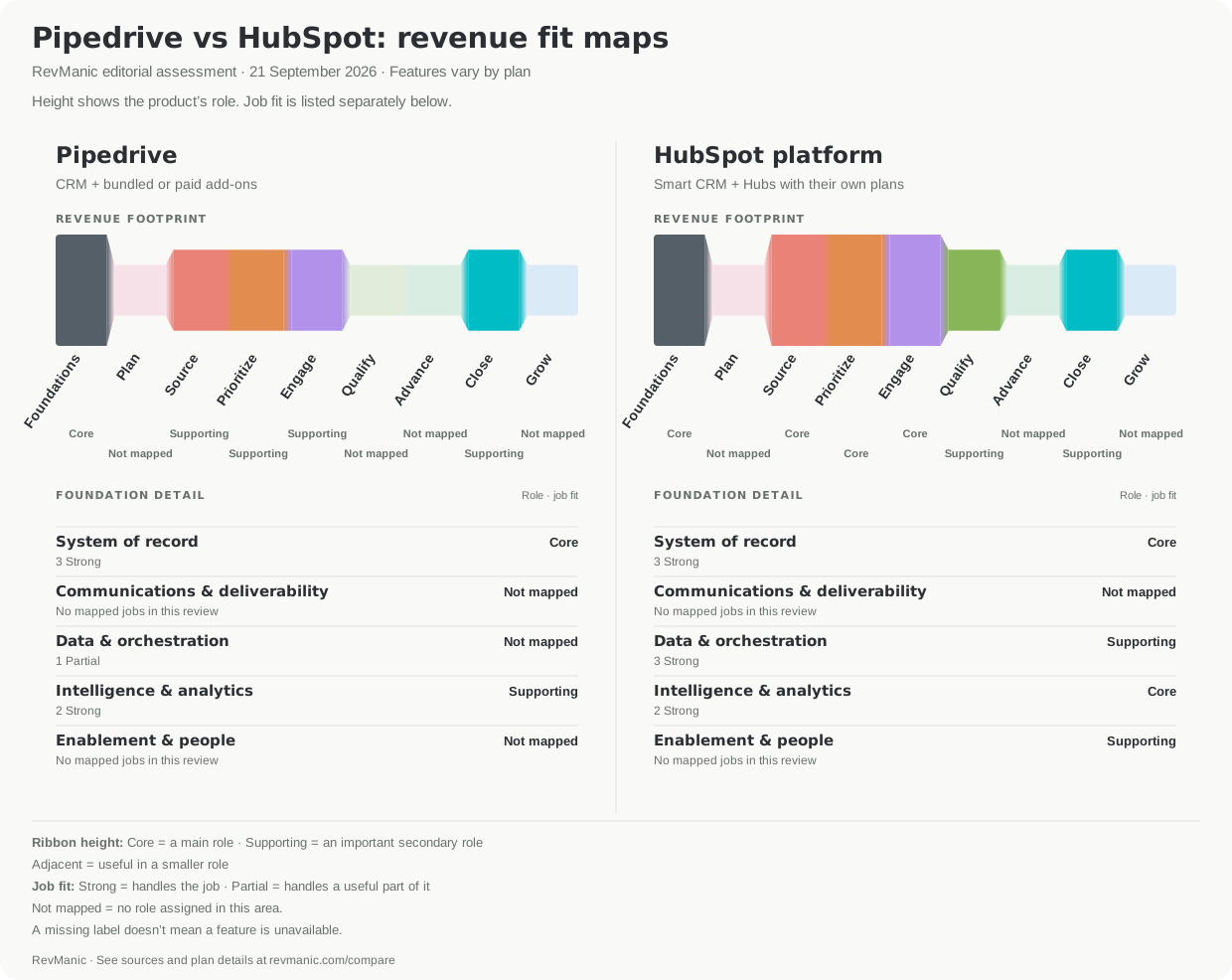
Both maps use the same areas and scale, so you can compare their shapes directly. Pipedrive's map includes add-ons that may be bundled or paid. HubSpot's map covers the wider platform, including Hubs that are sold separately. More coloured areas don't automatically make a product a better choice for your team.
The map shows where each product focuses. Core means an area is central to the product, so its segment is taller. Supporting means it plays an important secondary role; Adjacent means a smaller role. These labels describe the product's focus, while Strong and Partial describe its fit for a specific job.
Muted areas are Not mapped: we haven't assigned a role there. This doesn't mean we skipped the area or found that a feature was missing. Foundations brings together work that runs across the whole sales process, such as keeping CRM records. The rows below each map show those areas in more detail.
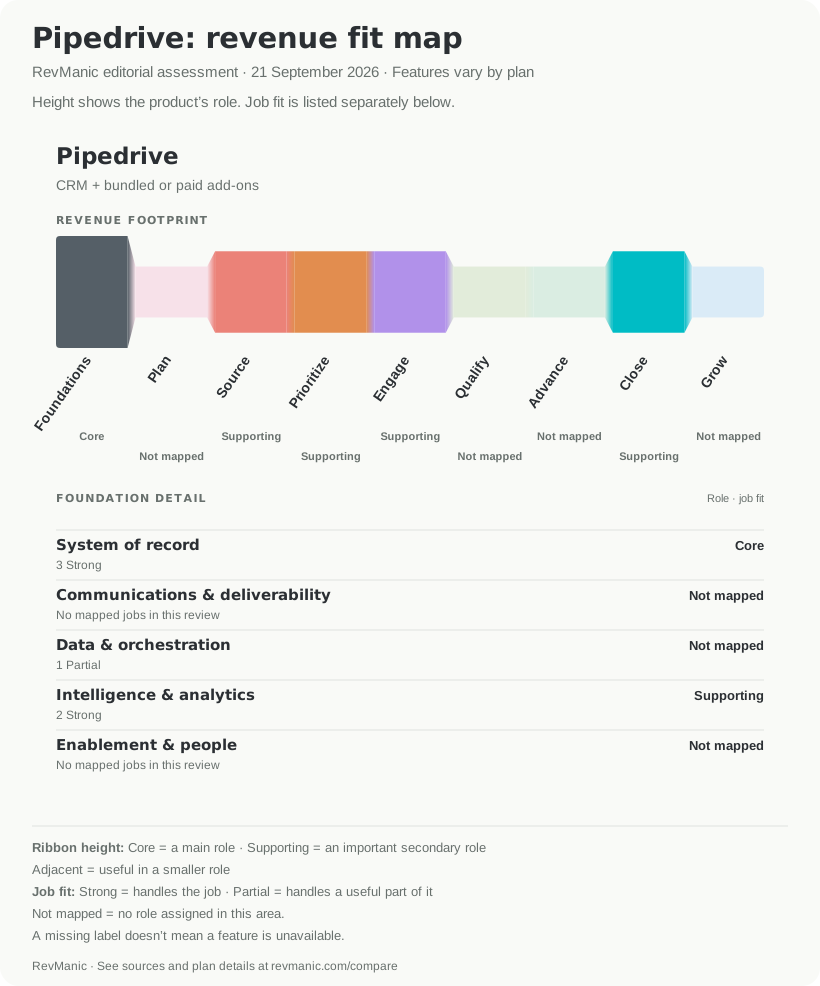
Pipedrive's main focus is keeping contact, organization, deal and activity data in one place. That's why System of record is Core on its map. Source, Prioritize, Engage, Close, and Intelligence and analytics are Supporting. The plan differences matter when you turn that map into a shortlist. Growth adds sequences, email sync, scheduling, automations and forecast view. Premium adds automatic assignment, organization enrichment, LeadBooster and Smart Docs. Pipedrive's plan matrix documents those boundaries.
HubSpot has five Core areas in this review: System of record, Source, Prioritize, Engage, and Intelligence and analytics. Data and orchestration, Qualify, Close, and Enablement and people are Supporting. HubSpot's products share Smart CRM, but have their own plans. Keep that in mind when reading the map: one Sales Hub subscription doesn't include everything shown. HubSpot's product overview and Product & Services Catalog explain how the products are packaged.
Open either map individually: Pipedrive's revenue fit map or HubSpot's platform fit map.
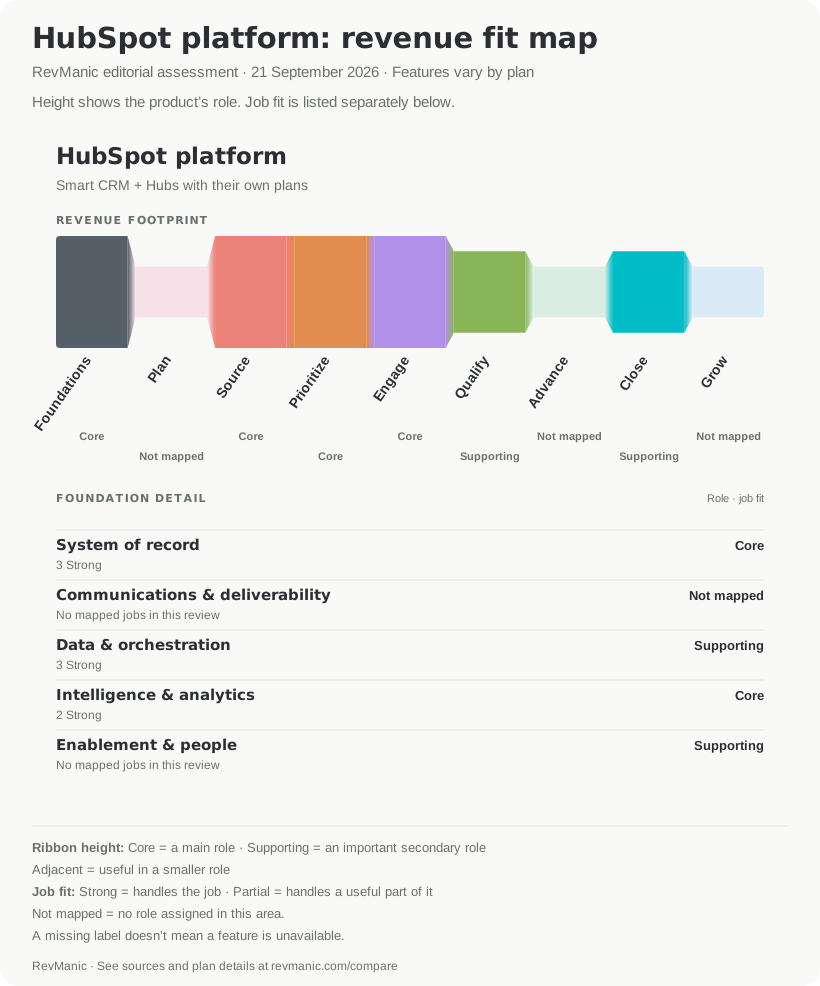
This review does not fully cover HubSpot's broader Service and Grow work. Those parts of its map are still incomplete. Focus on whether the additional jobs shown on its map matter to your team.
Compare the jobs your team must complete
| Sales job | Pipedrive | HubSpot | What changes the decision |
|---|---|---|---|
| Maintain CRM records and opportunities | Strong | Strong | Both cover records and activity history: Pipedrive plans, HubSpot CRM. |
| Run sequences and schedule meetings | Strong | Strong | Pipedrive sequences start on Growth; HubSpot sequences require Sales Hub Professional or Enterprise. |
| Send prospecting email | Partial | Strong | Pipedrive documents prospecting email through a connected mailbox within the sequence workflow; HubSpot specifies 500/1,000 sequence emails per user/day on Professional/Enterprise. Validate either against your volume. |
| Forecast and analyse pipeline | Strong | Strong | Pipedrive: forecast view/product forecasts Growth+, deal-revenue report Premium+. HubSpot: Sales Hub Professional/Enterprise. |
| Score fit and readiness | Unassigned | Strong | Pipedrive scoring applies to deals. HubSpot scoring: Sales Hub covers companies/accounts and deals; contact scoring requires Marketing Hub. |
| Route leads and accounts | Strong | Strong | Pipedrive automatic assignment is Premium+; HubSpot routing varies by workflow and edition. |
| Capture meetings and notes | Strong | Strong | Pipedrive Nova is on all plans. HubSpot Notetaker requires an eligible Sales or Service Hub Professional/Enterprise subscription and assigned seat. |
| Assess opportunity qualification | Unassigned | Partial | HubSpot playbooks guide questions and capture notes. Test your complete qualification method; property updates require Enterprise. |
| Prepare proposals and collect signatures | Strong | Strong | Pipedrive Smart Docs and HubSpot Revenue Hub have different plan and add-on requirements. Contract negotiation remains unassigned. |
| Orchestrate external workflows | Partial | Strong | Pipedrive sends CRM data to other tools when a rule is met; HubSpot Data Hub adds broader orchestration. |
| Synchronise and clean CRM data | Some capabilities confirmed; job unassigned | Strong | Pipedrive supports contact sync and manual merging. HubSpot Data Hub is sold for broader sync and data quality. |
Pipedrive can sync contacts and merge duplicates. We haven't confirmed enough to rate its fit for the broader job of syncing and cleaning CRM data. HubSpot's Partial qualification fit needs a similar explanation: its playbooks can guide questions and capture answers, but you'll need to check whether they cover your team's full qualification process.
HubSpot conversation intelligence is available on Sales or Service Hub Professional and Enterprise; tracked terms are the Enterprise-only part. Pipedrive Nova captures transcripts, summaries, action items and reviewed CRM-update suggestions on all plans. Both products have Strong fit for capturing conversations and notes, but the plan requirements differ.
What it costs for five sellers
To make the prices comparable, we looked at the same tasks in each product: CRM records, sequences, meeting scheduling and forecasting for five sellers. Prices are in USD with an annual commitment. HubSpot's quote tools need a separate purchase, which isn't included here.
| Package | Why it is in the comparison | Annual subscription | First-year fixed cost shown |
|---|---|---|---|
| Pipedrive Growth | Lowest Pipedrive tier with sequences, scheduler and forecast view | $2,340 | $2,340 |
| Pipedrive Premium | Adds automatic assignment, bundled LeadBooster and Smart Docs, organization enrichment and the deal-revenue forecast report | $3,540 | $3,540 |
| HubSpot Sales Hub Professional | Sequences, forecasting, company/deal scoring, Notetaker, playbooks and sales reporting | $5,400 | $6,900 including required $1,500 onboarding |
These totals use five seats at $39, $59 and $90 per month respectively, billed annually. We checked Pipedrive pricing and HubSpot Sales Hub pricing on 21 September 2026. Pipedrive says implementation is free for plans over $400 per year, which covers these five-seller scenarios. That statement does not promise free onboarding in every situation. The totals exclude taxes, usage overages, optional services and other Hubs.
If you have two sellers, HubSpot Free offers up to two users and 1,000 contacts. It gives you a useful $0 starting point for basic records, though it does not meet the Professional sequences-and-forecasting requirement used above. Pipedrive offers a 14-day trial rather than a permanent free tier. For ten sellers, the annual subscription equivalents are $4,680 for Growth, $7,080 for Premium and $10,800 for Sales Hub Professional, plus HubSpot's $1,500 onboarding in year one.
If your team must prepare proposals and collect signatures, include that requirement in your own total. Pipedrive Smart Docs is included on Premium and Ultimate or sold as an add-on on lower plans, with a connected Google Drive, OneDrive or SharePoint account. HubSpot's current CPQ, quotes and e-signature are in Revenue Hub Professional or Enterprise with Revenue Seats and signature limits. Check HubSpot Revenue Hub pricing, then calculate the total for everyone who needs to create or edit quotes. We have left current promotions out because they are too temporary to support this comparison.
Which should you choose?
Choose Pipedrive Growth if your team needs to maintain CRM records, run sequences, book meetings and forecast in a focused workflow with a lower fixed cost. Evaluate Premium if you also need rules-based assignment, LeadBooster, Smart Docs or organization enrichment.
Choose HubSpot if company or account scoring, guided qualification, syncing and cleaning data across tools, or working more closely with marketing and service makes the extra cost and mix of plans worthwhile for your team. Sales Hub can score companies and deals, while contact scoring belongs to Marketing Hub. Revenue Hub supplies the current quote and signature workflow.
You may also find that keeping your current CRM is the right decision. A switch makes sense when something your current CRM can't handle matters enough to justify moving your data, changing how the team works and paying for a new subscription.
Run the same trial in both products
Use non-sensitive sample data and give two sellers and one manager the same task in each product. Have them import 25 accounts and contacts, create five opportunities, assign ownership, run a short follow-up sequence, book and record a meeting, update the opportunity, and produce a forecast and pipeline report. Then try one real integration path. If proposals and signatures are mandatory, include that workflow too.
As they work, record whether each job can be completed on the quoted package, whether a step requires another Hub or add-on, which usage limits appear, and what the manager can check. Use these tasks to judge how well each product fits your team's day-to-day work.
Open the general RevManic comparison tool, or inspect Pipedrive and HubSpot side by side with the products preselected. The Pipedrive profile and HubSpot profile show the reviewed findings and sources behind the maps.
Editorial note
This comparison reflects RevManic's editorial opinion on how each product fits the work described here. Features, plans and prices can change. Check Pipedrive's website and HubSpot's website for current details.
Represent either product? Contact us to suggest an update, or claim your Pipedrive profile or HubSpot profile.
All articles